Let every one of your EAs
All inUnder control
EAGuard is an EA console that runs on your own PC: many accounts and terminals on one screen, rule-based auto breakers, local and cloud copy trading — data never leaves your machine, and you can intervene remotely anytime.
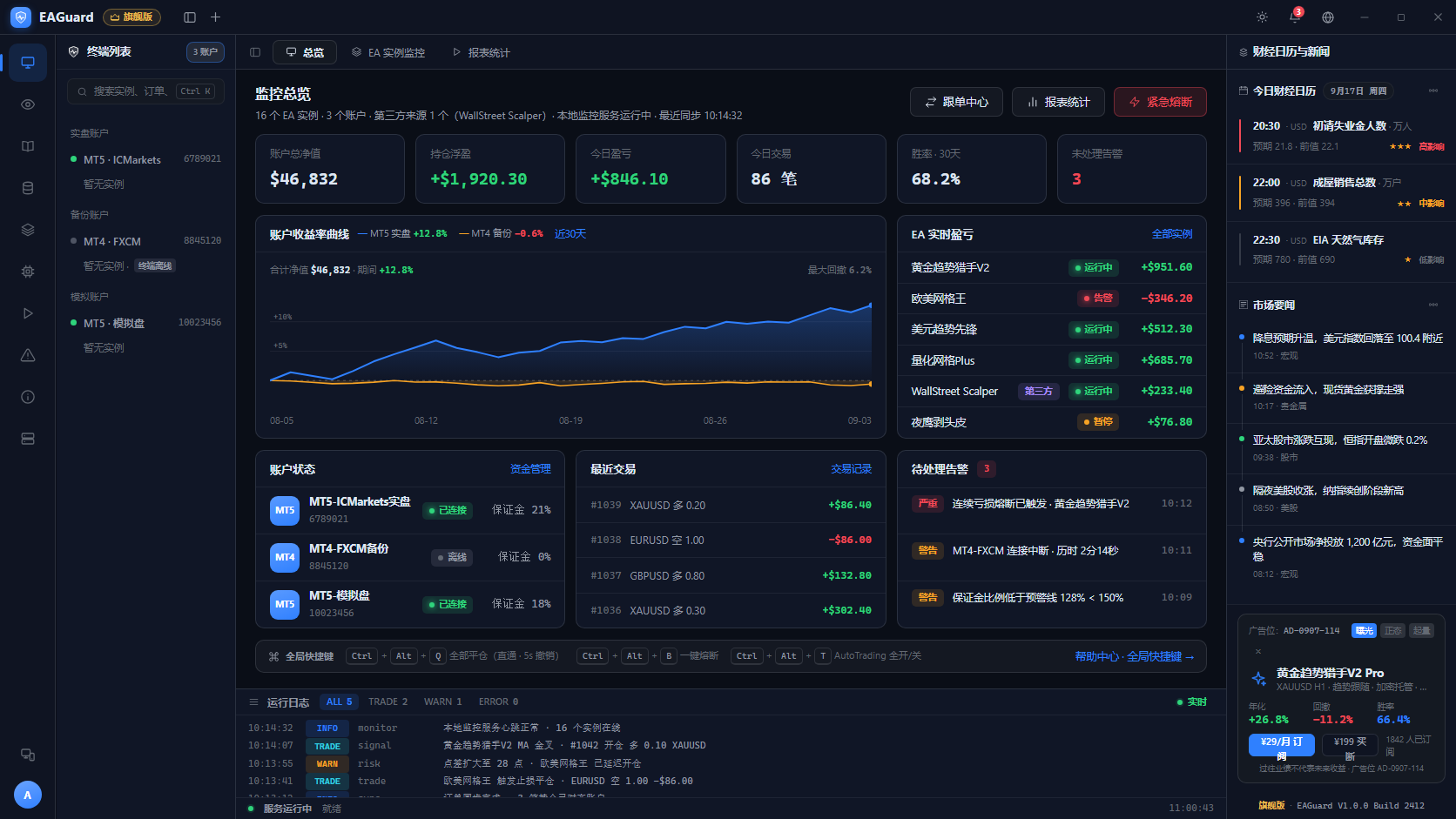
One console covering the whole EA trading workflow
From linking terminals and binding strategies, to live monitoring, auto risk control and remote intervention — EAGuard gathers the EAs scattered across your MT terminals onto one screen.
MT4 / MT5, many accounts and instances on one screen: equity, positions, pending orders and drawdown refresh in milliseconds, with auto-reconnect.
Three breaker types (consecutive loss, margin, drawdown) are configured visually; on trigger they auto-pause and push.
Same-machine multi-terminal copying: multiplier/fixed/proportional, forward & reverse, slippage protection — loopback only, never the internet.
Subscribe to live-verified authors in one click; code is escrowed encrypted and profit share is charged on gains only.
i OS / Android: check equity and positions anytime; remote pause and close need Face ID confirmation.
Four notification tiers — Telegram / We Com / email / system push — critical events delivered in seconds.
Start monitoring in three steps
It never changes any MT terminal setting; your EAs run as before while EAGuard stands guard.
Auto-discovers local MetaTrader 4 / 5, choose monitoring permission (Monitor-only / Monitor + Control), direct local port connection.
Create a monitoring instance per EA, bind a parameterized strategy or import from the marketplace/templates, and configure breakers.
Watch on desktop, get pushes on your phone; remotely pause, partially close or trigger the emergency stop when needed.
Copy Trading:Subscribe Live-verified Signal provider
Authors are live-verified and platform audited; risk score and drawdown are fully published; profit share is charged on profitable months only (high-water mark).
Designed to hand the keys back to you
EAGuard never holds or touches your trading funds. Monitoring commands run over local, end-to-end encrypted channels — every step is logged and auditable.
Quotes, positions, orders, strategies and logs are all stored in the local data directory; no trading data is uploaded except through channels you configure.
Monitor-only carries zero order risk; under Monitor + Control every close, deploy and breaker requires confirmation and is audited.
Three breaker types (consecutive loss / margin / drawdown) watch 24/7; on trigger they auto-pause and push to every channel, including your phone.
Monitoring and copy services listen only on loopback and LAN addresses; firewall rules are one-click and can be turned off anytime.
Start free, scale as you grow
Every paid plan includes a 14-day money-back guarantee; annual saves 20%. Pro users upgrading to Flagship get the remaining term prorated.